
Answer WhatsApp where the customer record already is
Messages sent to your business number arrive in the Falconzo shared inbox. Your team replies from there, links the conversation to the right customer, and leaves the follow-up on the record.
Why the business phone is a bad filing cabinet
For a lot of businesses, WhatsApp is where the real conversation happens. It is also where the record of it disappears.
Customers book jobs, change orders and complain over WhatsApp because it is easy for them. The trouble starts on your side. The conversation lives on one handset, only one person has read it, and nobody else can see what was agreed.
When that person is off, the customer repeats themselves. When they leave, the history leaves with them. And the CRM says nothing has happened since March, which is not what the customer remembers.
Falconzo brings the messages onto a screen the whole team can use, and attaches them to the customer they came from. The phone goes back to being a phone.
What WhatsApp in Falconzo gives you
Same number, same app for your customer, a different place for your team to work.
The number customers already have
Connect your business WhatsApp number. Customers keep messaging the number on your van, your invoice and your shop window.
Messages arrive in the shared inbox
Incoming messages appear in Falconzo alongside your other channels, so answering does not depend on who is holding the phone.
Replies sent from Falconzo
Your team answers from the same screen as the customer record. The reply lands back in the customer's WhatsApp thread as normal.
Linked to the customer
Attach the conversation to the contact, company, lead or deal it belongs to, and it becomes part of that record's history.
The next step written down
Turn a promise made in a message into a task on the record, with a due date and an owner, instead of a note on the back of a docket.
Connected on your terms
The connection is made through the provider's own authorisation screen, and can be removed from settings whenever you decide.
The path a message takes
From the customer pressing send to the follow-up being somebody's job.
When this happens
A customer messages your WhatsApp number
The message arrives in the shared inbox in Falconzo rather than on one person's phone.
Then
The conversation is matched to a customer
The sender's number points at the record it belongs to, and a teammate confirms the link before anything is attached.
Then
A teammate replies from Falconzo
The answer goes back into the same WhatsApp conversation the customer started.
Then
The follow-up lands on the record
A task on the contact carries the next step, with a due date and somebody's name against it.
A Saturday enquiry, end to end
One message, followed all the way from the customer's phone to the diary.
Connect your business number
You connect WhatsApp through the provider's own authorisation screen. Nothing about your number changes, and nothing changes for the people who already have it saved.
A customer messages on a Saturday morning
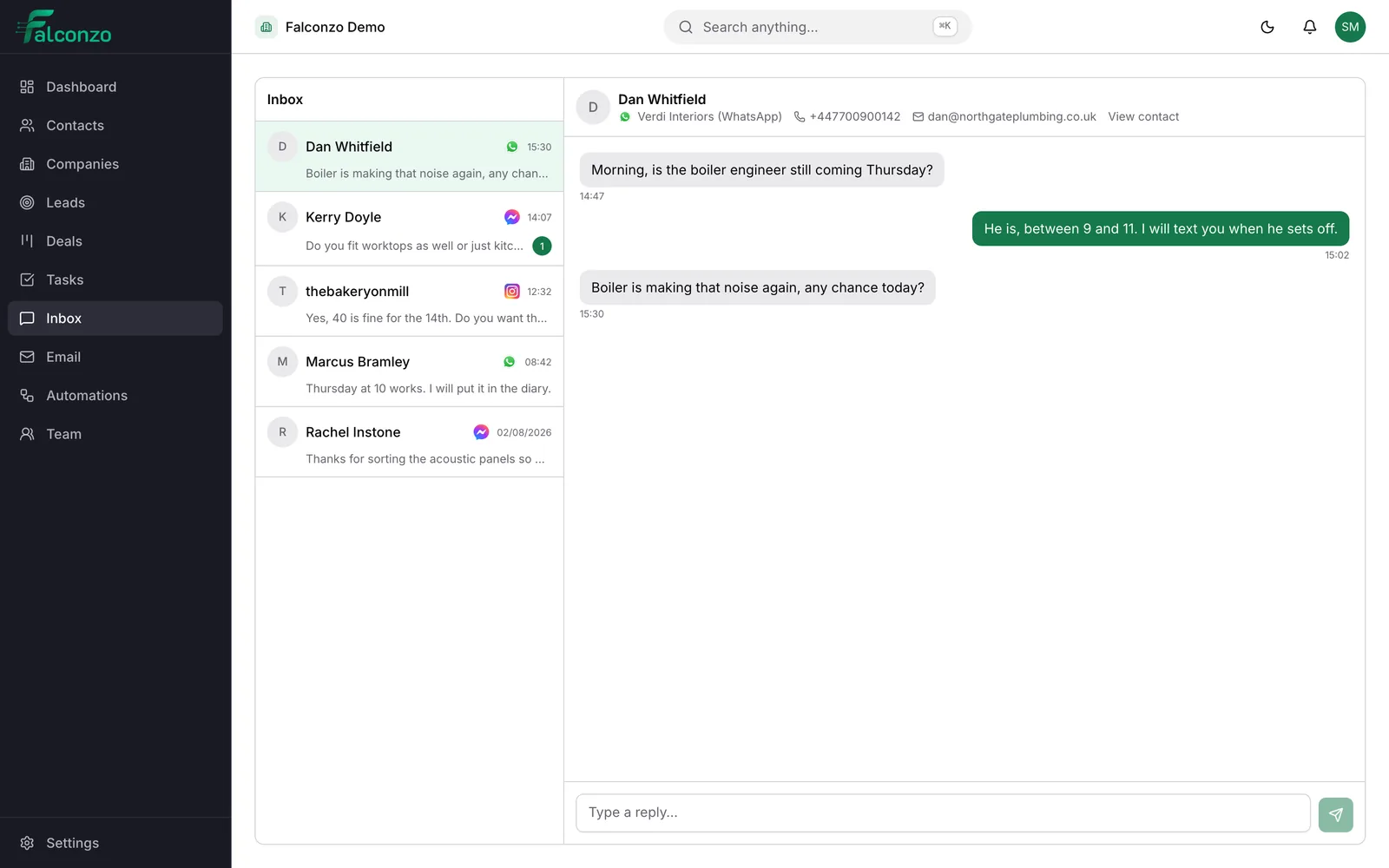
Take a heating engineer as the example. A customer messages the business number: the boiler is making a noise again and can somebody come out. On an ordinary Saturday that message sits on a phone in a van until Monday.
It appears in the shared inbox instead
The message shows up in Falconzo with the sender's number and what they wrote. Whoever is on duty sees it in the same list as the Messenger and Instagram enquiries, so there is one place to look.
Falconzo points at the customer it came from
The number belongs to a contact you serviced in the spring. The match is offered against that record and a teammate confirms it, which links the conversation to the customer and their service history. If the number were new, or shared by two records, the decision would still be a person's.
A teammate answers without leaving the record
They can see the last visit, the boiler model in a custom field and the open quote for a replacement part, so the answer is a real one: an engineer can be there Tuesday morning.
The promise becomes a task
Before closing the conversation they add a task on the contact to confirm the Tuesday slot on Monday, assigned to whoever books the diary. The next person to open the record sees the message, the reply and the commitment together.
Identifying the sender
A number is a good clue, not a decision
The sender's number is usually all you get, and it is usually enough. Your team sees it next to the message and links the conversation to the record it belongs to.
Sometimes it is not enough. A number can be shared by a couple who are two separate contacts, or belong to a site office rather than a person, or be brand new to you. In those cases a person decides, because attaching a conversation to the wrong customer puts one household's business into another one's history.
If the sender is nobody you know yet, treat them like any other new enquiry: create the lead, follow it up, and the conversation is already sitting with the record when it converts.
- The conversation links to a contact, company, lead or deal
- Ambiguous senders are settled by a person, not assumed
- New senders can become a lead and be followed like any other
What you end up with
Nobody has to ask who has the work phone. Any teammate with the right permission can see the enquiry, read what was agreed and answer it properly.
The customer's record tells the truth about the relationship. A message about a noisy boiler on Saturday, the reply, the visit booked and the quote that followed sit together, so the next conversation starts from what actually happened.
Related pages




Shared inbox
Where WhatsApp, Messenger and Instagram conversations arrive together.
Read moreMeta integration
What connecting a WhatsApp number, a Facebook Page or an Instagram account involves.
Read moreEmily Hartley
Operations Director
- Company
- Verdi Interiors
- Owner
- Sam Mercer
- Service type
- Fit-out
Contacts
The records a conversation attaches to, with phone numbers, custom fields, tasks and notes.
Read moreTasks
The follow-up work that comes out of a message, with an owner and a due date.
Read moreGet WhatsApp off the work phone
Book a walkthrough and we will show you how a message to your business number would reach your team and your customer records.