
Integrations
Falconzo works with the mailbox you already have
Connect the email and messaging accounts your business already runs on, and your customer records start filling themselves in as you work.
Why connect anything at all
A CRM that knows nothing about your email is a CRM somebody has to keep updating by hand.
Most of what you know about a customer arrives in a message. The quote you sent, the objection they raised, the date they said they would decide: all of it sits in a mailbox, and none of it reaches the customer record unless somebody stops and types it in.
Connecting your mailbox closes that gap. Falconzo reads your work email, matches conversations to the right contacts and companies, and shows them on the record. Nobody has to remember to log anything, because the log is the conversation itself.
The same goes for messaging. Customers ask questions on WhatsApp, Messenger and Instagram, and those threads are as much a part of the relationship as email. Falconzo brings them into a shared inbox so the team can answer them in one place.
What a connection gives you
The same set of benefits applies whichever provider you use.
Your own mailbox, in your CRM
Everyone on the team connects the mailbox they already use. Their work email then appears beside the customer records it belongs to, with no forwarding rules and no copy and paste.
Shared addresses for the team
An address such as sales@ or support@ can be turned into a shared mailbox, so the whole team can see it, reply to it and hand conversations to each other.
Messaging in the same inbox
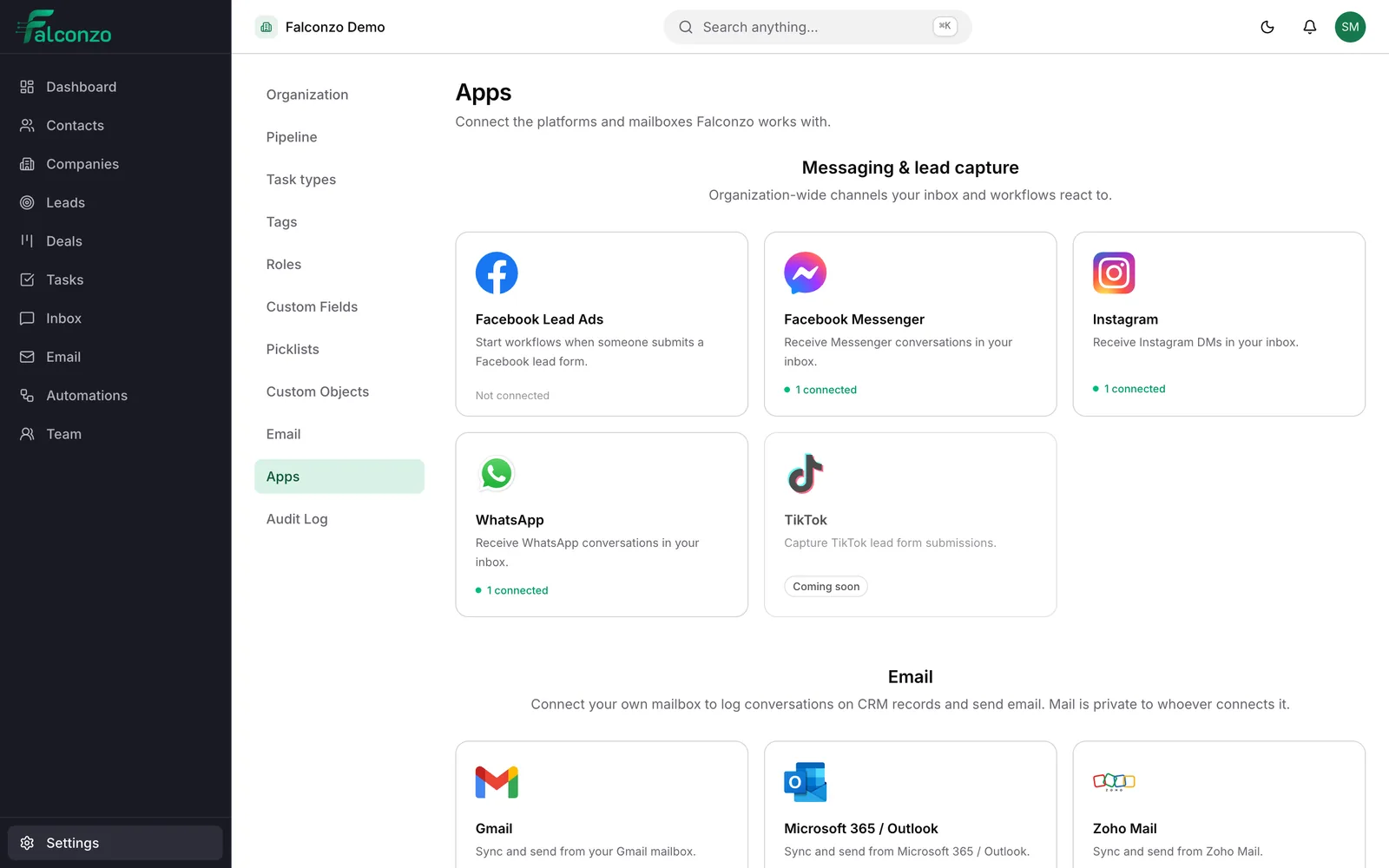
WhatsApp, Facebook Messenger and Instagram direct messages arrive in a shared inbox in Falconzo and can be answered there, next to the customer record.
Lead forms that become leads
Facebook and Instagram lead forms create leads in Falconzo, so an enquiry becomes a record with an owner and a status instead of a notification somebody has to catch.
Conversations tied to records
Threads are matched to contacts, companies, leads and deals by email address. A single exact match is linked for you, and anything less certain waits as a suggestion.
Any other mailbox
If your mail is not with one of the named providers, connect it over IMAP and SMTP using your own server settings. Yahoo Mail connects this way too.
Choose your provider
Pick the service your mail or messaging already lives on. If it is not listed by name, IMAP and SMTP will cover it.
Google
Gmail and Google Workspace mailboxes. Approve the connection on Google's own screen and your work email starts syncing.
Microsoft
Microsoft 365 and Outlook mailboxes, connected through Microsoft's own sign-in and consent screen.
Meta
Facebook Messenger, Instagram direct messages, WhatsApp, and Facebook and Instagram lead forms.
Zoho
Zoho Mail accounts, connected through Zoho's own authorisation screen.
Any IMAP and SMTP mailbox
Your own mail server, or a provider we do not list by name. You supply the server settings and sign in with your mailbox credentials.
Yahoo Mail
Connected as a standard mailbox, using IMAP for reading and SMTP for sending.
How connecting works
Five short steps, and you can undo the whole thing from settings.
Choose a provider in settings
Open the integrations settings in Falconzo and pick the mailbox or messaging channel you want to connect.
Approve it on the provider's own screen
Falconzo sends you to Google, Microsoft, Zoho or Meta to sign in and approve access. You type your password on their site, never into Falconzo.
Choose how far back to sync
The first sync reaches back over a window you pick: 30, 90 or 180 days. Ninety days is the default and suits most teams.
Confirm the suggested matches
Falconzo links what it is certain about and puts the rest in a review list. Confirm the ones that are right and dismiss the ones that are not.
Disconnect whenever you want
A connection can be removed from settings at any time, which deletes the stored credentials. Your CRM records stay exactly where they are.
What stays private
Connecting a mailbox should not mean handing your inbox to the office.
A mailbox connection starts as a personal one. Its contents are visible only to the person who connected it, so your colleagues do not see your mail and you do not see theirs. If an address really does belong to the team, someone with the right permission can turn that connection into a shared mailbox afterwards.
You always sign in on the provider's own page. Falconzo stores the resulting credentials encrypted, never sends them to your browser, and deletes them when you disconnect. Messages are cleaned before they are displayed, and remote images stay blocked until you choose to load them, because loading them tells the sender you opened the message.
There is more detail on the security page, and the FAQ answers the questions people tend to ask before they connect anything.
Falconzo connects to
- Gmail
- Google Workspace
- Microsoft 365
- Outlook
- Zoho Mail
- Yahoo Mail
- IMAP and SMTP
- Messenger
Where these connections show up
Once a provider is connected, the work happens on the channel pages: the email workspace, the shared inbox, WhatsApp, Messenger, Instagram and Meta lead forms.
Not sure which connection you need?
Tell us how your team handles email and messages today, and we will show you what connecting them to Falconzo would look like.