
Facebook Messenger
Treat a Page message like the sales enquiry it usually is
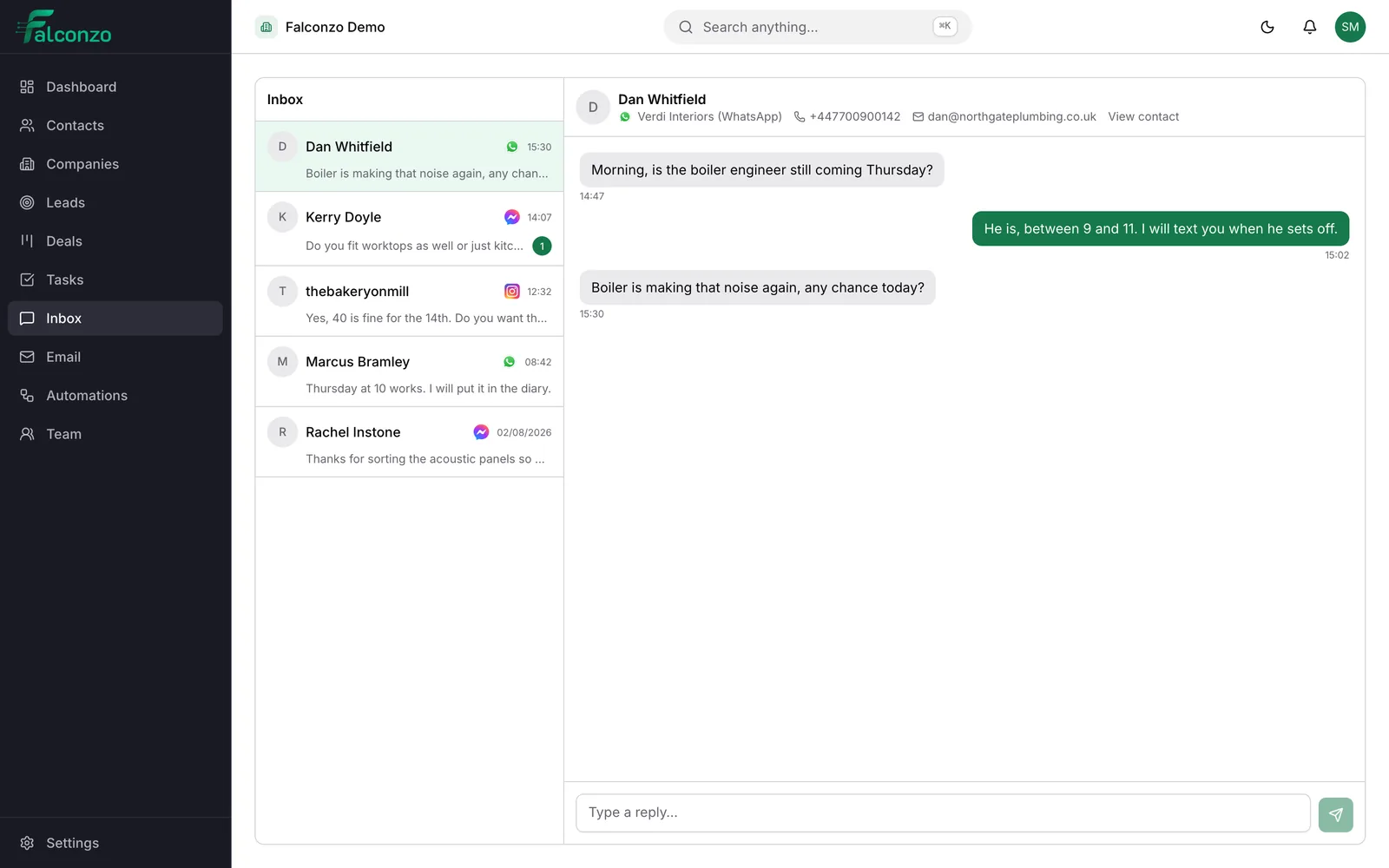
Messages sent to your Facebook Page arrive in the Falconzo shared inbox. Answer them there, record who the sender is, and let a good question turn into a lead instead of a notification.
Why Page messages get wasted
You pay for the advert, the post does the work, and the enquiry lands somewhere nobody is responsible for.
The Page inbox belongs to whoever manages the Page, which is rarely the person who can quote a price. Sales questions get answered late, or answered by someone guessing, or answered well and then never written down anywhere.
The real cost is invisible. Nobody can say how many enquiries the Page produced last month, which of them turned into work, or who was supposed to chase the one that went quiet.
Falconzo pulls those messages into the shared inbox and lets you give each one a name, an owner and a next step. A conversation becomes a lead, and a lead becomes something you can count.
What Messenger in Falconzo gives you
Everything a Page enquiry needs to survive the weekend.
Page messages in your shared inbox
Messages sent to your Facebook Page arrive in Falconzo next to your other channels, so an enquiry is not one more notification to miss.
Answer from the CRM
Reply from the same screen that holds your records. The customer stays in Messenger and never sees a change of tool.
Strangers become leads
Most Page messages come from people you have never sold to. Create a lead with a name, a source and an owner, and the enquiry stops being anonymous.
Attached to the record
Link the conversation to the lead, contact, company or deal it belongs to so the exchange is on file rather than in someone's notifications.
A path to a deal
A question about a price is the start of a sale. Raise a deal from the enquiry and it moves through your pipeline like any other.
One queue, several channels
Messenger sits alongside WhatsApp, Instagram and email, so nobody has to decide which app to check first.
From a question to a customer
The shape of a Page enquiry when it is handled properly.
When this happens
Someone messages your Facebook Page
Usually after seeing a post or an advert, and usually asking a question that is really a buying signal.
Then
The message joins the shared inbox
It lands in the same queue as your other channels, where anyone with permission to work it can see it.
Then
You give the enquiry a name
Link the conversation to an existing record, or create a lead with a source and an owner if the sender is new to you.
Then
It becomes work you can follow
A reply, a task with a due date and, when it is worth one, a deal on the pipeline.
A Friday evening enquiry, end to end
Following one message from a Page post through to a deal on the pipeline.
Connect your Facebook Page
Connect the Page through Facebook's own authorisation screen. Your Page, your posts and the way people message you all stay exactly as they are.
A post does its job
Take a kitchen showroom as the example. A photo of a finished installation goes up on Friday, and by the evening somebody has messaged the Page asking what the worktop was and roughly what a kitchen like that costs.
The enquiry lands in the shared inbox
Instead of a red dot that the person who manages the Page will see on Monday, the message arrives in Falconzo, in the same queue as the WhatsApp and Instagram enquiries.
Turn a profile name into a record
A Facebook profile name is not much to file a customer under. The salesperson answers the question, asks which town the property is in and whether an email address is the easiest way to send a brochure, then creates a lead with those details, a source of Facebook and their own name as owner.
Link the conversation to the lead
The conversation is attached to that lead, so the questions asked and the answers given belong to the enquiry rather than to whoever happened to reply.
Move it forward like any other enquiry
A task is set to send the brochure on Monday. The lead status moves from New to Contacted, and once the showroom visit is booked it moves to Qualified.
Convert when it becomes real
Converting the lead creates the contact, the company where one applies, and the deal, in a single step. A question about a worktop on a Friday evening is now a deal with a value, a stage and an expected close date.
Who answers
The right person can reach the message
Answering a Page message should not require handing out access to the Page itself. In Falconzo the conversation is in the shared inbox, and roles and permissions decide who works it.
That makes cover normal rather than heroic. Whoever is on the enquiries this week sees the same queue, reads what was already said, and answers without a chain of screenshots in a group chat.
- Messenger conversations sit in the shared inbox with your other channels
- Roles and permissions decide who can see and answer them
- Replies go back into the customer's Messenger thread
What you end up with
Enquiries from your Page stop being anonymous. Each one has a name, a source, an owner and a status, so you can see how many arrived and what became of them.
The work carries on properly after the first reply. The brochure gets sent because a task says so, the showroom visit is on the record, and the deal that came out of a Friday night message is somewhere your whole team can see it.
Related pages




Shared inbox
The one queue that Messenger, WhatsApp and Instagram conversations arrive in.
Read moreMeta integration
What connecting a Facebook Page, an Instagram account or a WhatsApp number involves.
Read moreEmily Hartley
Operations Director
- Company
- Verdi Interiors
- Owner
- Sam Mercer
- Service type
- Fit-out
Leads
Status, source and owner on an enquiry, and what happens when you convert it.
Read more
Request a quote
Emily Hartley
[email protected]
Office fit-out
New lead created
Meta lead forms
The other way Facebook sends you business: a form submission that becomes a lead.
Read moreStop losing enquiries in the Page inbox
Book a walkthrough and we will show you what a Facebook message looks like once it reaches your team and your pipeline.