
Your mailbox, beside the customer it belongs to
Falconzo connects the mailbox you already use, attaches each conversation to the right contact, company or deal, and lets your team answer from the same screen the records live in.
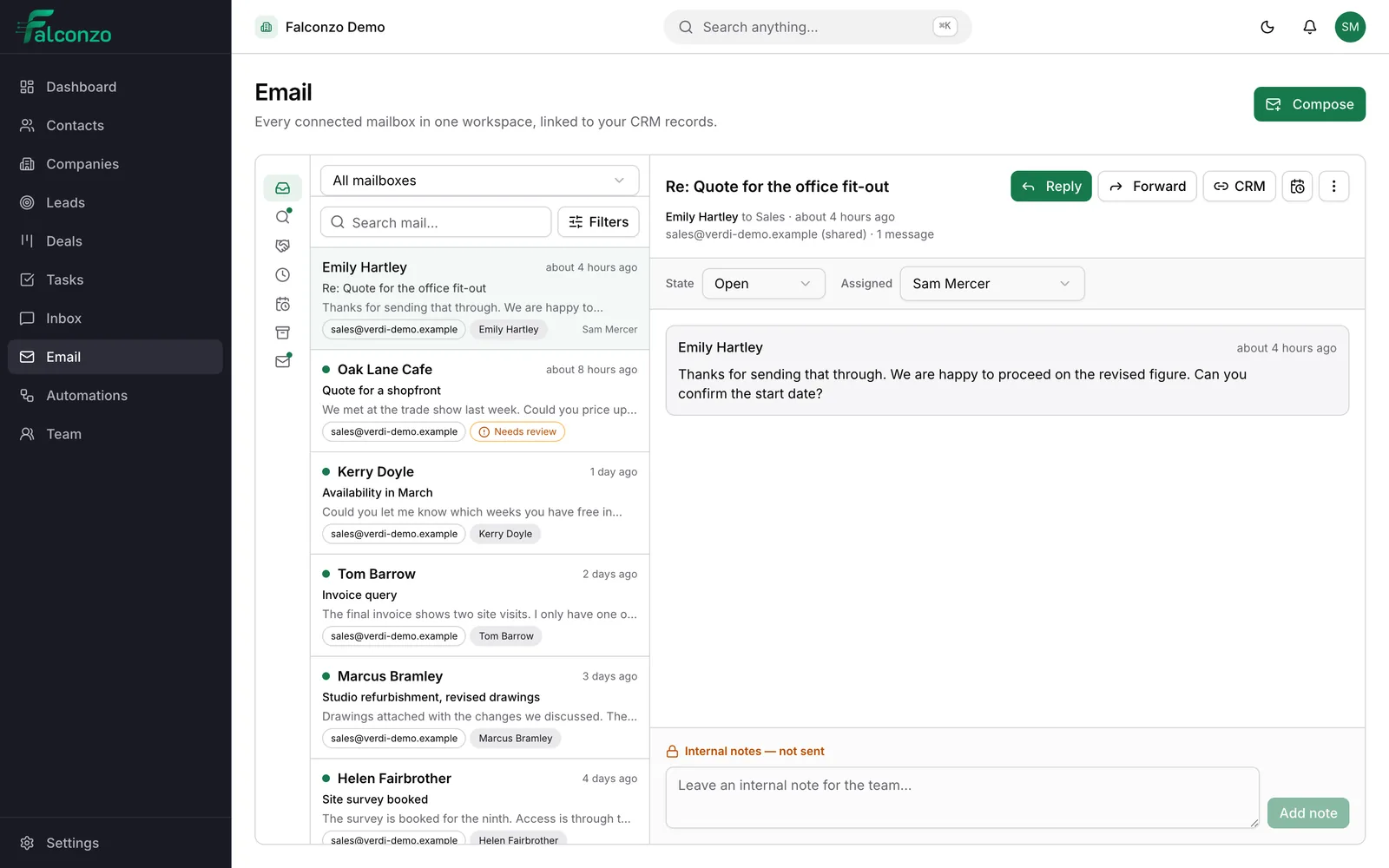
Why email belongs in the CRM
Most of what you know about a customer is already written down. It is just written down inside somebody's inbox.
A customer replies to a quote on Tuesday. The person who sent it is on leave, the reply sits in their personal mail, and nobody else knows the deal has moved. By the time it surfaces, the customer has asked twice.
Copying email into a CRM by hand never survives a busy week. People forward messages to a shared address, paste extracts into notes, or simply forget, and the record ends up a partial account of what actually happened.
Falconzo works the other way around. Mail keeps arriving where it always did, and Falconzo brings it into the same screen as the customer record, so the history builds itself while everyone works normally.
What the email workspace does
All of it runs on the mailbox you already have. There is no new address to publish and nothing for your customers to learn.
The mailbox you already use
Gmail and Google Workspace, Microsoft 365 and Outlook, Zoho Mail, Yahoo Mail, or any mailbox that works over IMAP and SMTP. Each person connects their own.
Threads matched to records
A conversation is attached to the contact, company or deal it belongs to. Automatically when the match is certain, as a suggestion when it is not.
Views that sort the queue
All work email, needs review, open deals, waiting for reply, follow-up today, unread and archived. The next thing to answer is never buried.
Shared mailboxes
A connection starts personal. Someone with the right permission can turn a sales@ or support@ address into a shared mailbox the whole team works.
Assignment, status and internal notes
A shared conversation has an assignee and an open, closed or snoozed state, plus notes that stay inside your team and are never sent out.
Care about what leaves the building
Falconzo refuses to send to anyone marked as opted out of email, and holds back remote images in an incoming message until you choose to load them.
A support email, from first sync to follow-up
The whole path a message takes, using a shared support address as the example.
Connect the mailbox
You sign in through your provider's own authorisation screen. Falconzo asks how far back the first sync should reach: 30, 90 or 180 days, with 90 as the default. After that, mail keeps syncing on its own.
Make the support address a shared mailbox
Every connection starts as a personal one. Someone with the right permission converts the support@ connection into a shared mailbox, and from then on the queue is governed by permissions rather than by who happens to know the password.
A customer writes in
A customer emails support@ about an order that has not arrived. The thread appears in the shared queue, unread. The message is cleaned before it is shown, so scripts and event handlers are stripped out and remote images stay unloaded until someone asks for them.
Falconzo works out who it is from
That address belongs to exactly one contact, so the thread is linked to them without anyone lifting a finger. Open the conversation and their details, their company and their open deals sit beside the message.
Anything less certain waits for a person
Had the address matched two people, or matched a company only by its web domain, Falconzo would have offered a suggestion instead. A teammate confirms the right record or dismisses it. If it turns out not to be customer work at all, they mark the thread as not CRM related and can stop that address being suggested again.
Someone takes ownership
A teammate assigns the conversation to themselves so the rest of the team can see it is being handled, then adds an internal note with what the warehouse told them. That note lives on the conversation and is never sent to the customer.
They reply from Falconzo
The answer goes out using the shared template for delivery delays, with the sender's own signature. It stays in the same thread in the customer's mail client, so the exchange reads like ordinary email, because it is ordinary email.
The follow-up is set before the tab closes
They add a task on the contact to check the shipment on Thursday and mark the conversation closed. Archiving clears it from their own view, and everyone else still sees the conversation exactly as it stands.
When the follow-up should not wait for a person
Email events can start a workflow, so routine chasing happens whether or not anybody thinks of it.
When this happens
An email is received
A message arrives in a connected mailbox and Falconzo links it to the customer record it belongs to.
Then
A follow-up task is created
Falconzo puts a task on that record for its owner, with a due date, so the next step does not depend on anyone remembering it.
Matching
Automatic when it is certain, a suggestion when it is not
Falconzo matches a thread to your records by email address. When exactly one contact or lead holds that address, the link is made for you and nobody has to think about it.
Everything else is offered rather than applied. Two people sharing an address, a match that is close but not exact, or a company recognised only by the web domain in the address: each of those arrives as a suggestion on the conversation, waiting for someone to confirm or dismiss it.
The restraint is deliberate. A wrong automatic link is quiet and expensive. Another customer's messages fill up the record, the next person to open it believes what they see, and the mistake tends to show itself in front of the customer. A suggestion costs one click. A bad link costs the record.
- One exact match on an email address links on its own
- Anything ambiguous waits for a person to confirm it
- A company matched only by web domain is always a suggestion
- Mark a thread as not CRM related, and stop that address being suggested again
Privacy and teamwork
Personal mail stays personal, shared mail stays shared
A mailbox someone connects for themselves is theirs. The contents are visible only to the person who connected it, so nobody joins Falconzo and finds a manager reading over their shoulder.
A shared mailbox is a different thing on purpose. Access is governed by permissions, so the people whose role covers sales or support work the queue and nobody else does.
Read state and archiving belong to each person, which matters more than it sounds. On a shared address, one teammate reading or archiving a conversation does not make it vanish for everyone else. The conversation carries the team view separately: open, closed or snoozed, an assignee, and internal notes that never leave Falconzo.
- A connection starts personal and is only shared when someone with permission shares it
- Read and archive state are per person, never team-wide
- Open, closed and snoozed is the state the whole team sees
- Internal notes are for colleagues and are never sent to the customer
Writing back
Replies that read like ordinary email
Reply and forward keep the conversation threaded in the recipient's mail client. Nothing about the exchange announces which tools you use.
Everyone has their own signature, and message templates are shared, so the answer to a common question is the answer your team agreed on rather than whatever got typed in a hurry.
Attachments are listed on the message and downloaded when somebody needs them. The files stay with your mail provider and are fetched on request.
- Per-user signatures and shared message templates
- Attachments listed on the thread, downloaded on demand
- Sending to a contact or lead marked as opted out is refused
- Remote images stay blocked until you load them, because they can tell the sender the message was opened
What you end up with
The customer record stops being a summary somebody typed and starts being the real account of the relationship: the quote, the reply, the complaint, the resolution and the task that came out of it, in order.
Cover gets easier. When someone is away, a conversation on a shared address is visible, assigned and annotated, so whoever picks it up reads two lines of internal notes instead of guessing what was promised.
And the records stay worth trusting, because Falconzo would rather ask you than guess.
Related pages




Shared inbox
WhatsApp, Messenger and Instagram conversations answered in one place, next to your email.
Read moreWhen
A lead form is submitted
Then
Create the lead, assign an owner
Then
Schedule the first follow-up
Automations
Start a workflow when an email is sent, received, replied to, linked to a record or fails to deliver.
Read more
Emily Hartley
Verdi Interiors
Connect a Gmail or Google Workspace mailbox to Falconzo.
Read moreEmily Hartley
Verdi Interiors
Microsoft
Connect a Microsoft 365 or Outlook mailbox to Falconzo.
Read moreEmily Hartley
Verdi Interiors
Zoho
Connect Zoho Mail, or any other mailbox over IMAP and SMTP.
Read moreYour mailbox
Visible only to you
sales@
Shared with 3 colleagues
Security
How mailbox credentials are stored, how mail is cleaned before it is displayed, and who can see what.
Read moreSee your own mailbox beside your own records
Book a walkthrough and we will show you what matching, suggestions and shared conversations look like for the way your team already works.